

Blog
Nokia 2780 Flip Review: The Honest Senior-Phone Verdict

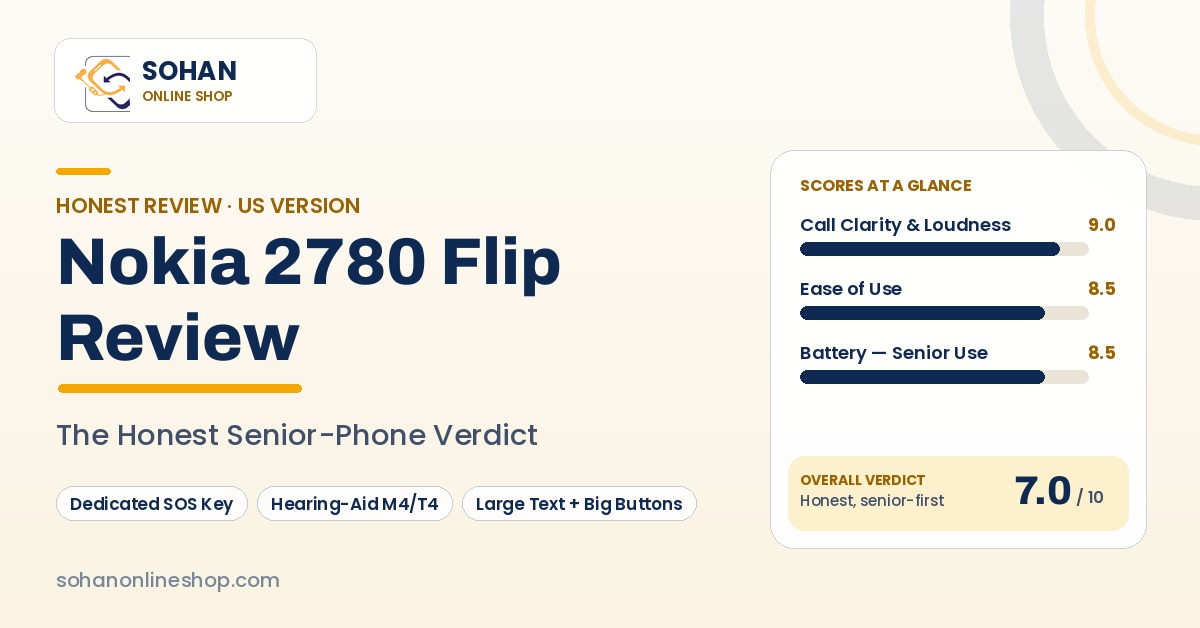
Nokia 2780 Flip Review: The Simple Phone With One Button That Matters
Somewhere between the glass slab your parent squints at and the “senior phone” that treats them like a child, there is a gap — and this flip phone sits in it. Here is the whole truth about its SOS button, its hearing-aid rating, and the ten minutes of setup it needs first.
Big buttons, a loud earpiece, open to answer and close to hang up. No passwords, no updates demanding attention at breakfast. These are the four facts that decide this phone.
No photo of this phone exists that we’re licensed to publish — so no stock picture and no drawing. Until we can shoot one ourselves, the facts above are the portrait.
- The SOS key is real — and inert until you set it up. Ten minutes of family homework turns it into a call-chain that rings your emergency contacts one by one.
- Hearing is its superpower: top-tier M4/T4 rating, a loud earpiece, and RTT real-time text during calls.
- No WhatsApp. Ever again. WhatsApp ended on KaiOS in February 2025 — old reviews saying otherwise are just old.
- Battery truth: days between charges in senior use — but continuous 4G talking is the weak spot (PCMag’s lab test: 3 hours 24 minutes).
- Carriers: T-Mobile is the safest home; Verizon works for most; AT&T — check the IMEI first. There is no Wi-Fi calling.
Somewhere between the glass slab your parent squints at and the “senior phone” that treats them like a child, there is a gap. The Nokia 2780 Flip sits in it: a proper flip phone with big buttons and a loud earpiece. Open it to answer, close it to hang up. No passwords, no updates demanding attention at breakfast.
On its side sits a small key most reviews barely mention: a dedicated SOS button that, once your family sets it up, calls for help through your whole contact list until somebody picks up. That button — what it does, what it doesn’t, and the ten minutes of setup it needs first — is the real story of this phone.
We sell Nokia feature phones every day, and buyers of phones like this ask the most honest questions in the business: Will Mum actually be able to use it? Will she hear it ring? If she falls, does it do anything? We answer those here the way we answer them at the counter.
Buy it if: you’re choosing a simple phone for a parent or grandparent, hearing clarity matters, and someone in the family will spend ten minutes setting it up properly.
Skip it if: your family lives on WhatsApp, your parent needs turn-by-turn maps, or the home has weak carrier signal and depends on Wi-Fi calling.
Our editorial scores — our own assessment, not Amazon’s ratings.
Check the Nokia 2780 Flip on Amazon →01The problem this phone actually solves
Nobody buys this phone on a whim. It is bought at a specific, slightly anxious moment — worth naming honestly:
| Your problem | How this phone answers it | Where it can’t |
|---|---|---|
| Mum’s smartphone confuses her | Big physical buttons, open-to-answer, nothing to update or log into | KaiOS menus are slower, fussier than old basic Nokias |
| Dad can’t hear the ring or the caller | Loud alerts and earpiece, top-tier M4/T4 rating, real-time text (RTT) in calls | No Wi-Fi calling — a weak-signal house stays weak-signal |
| You worry about a fall at home | A real SOS key: calls the family in a chain, then texts, then talks handsfree | Not a medical alert: no fall detection, no 911 auto-dial, inert until set up |
| The family chat keeps everyone close | Calls and SMS still reach everyone | WhatsApp ended on this platform in 2025 |
| Charging is one chore too many | Days between charges; removable battery, swappable in seconds | Wi-Fi and Bluetooth left on drain standby much faster (fix below) |
02The SOS button: the feature that justifies this phone
Plenty of phones bury “emergency call” three menus deep, where a frightened person will never find it. The 2780 puts a physical SOS call key on the side, next to the volume keys. From HMD’s user guide, exactly what it does:
- Hold it for 3 seconds, or press it twice quickly, and the phone starts calling your ICE contacts (In Case of Emergency — the family list you choose).
- If nobody answers within 25 seconds, it moves to the next contact — cycling through the list up to 10 times.
- If still nobody answers, it can send a pre-written SOS text message to those contacts.
- When someone answers, the call switches to loud handsfree automatically — designed for someone who has fallen and can’t hold the phone to their ear. That detail convinces us HMD actually thought about this.
03Set up the SOS button together — 10 minutes
Do this with your parent, at their kitchen table, the day the phone arrives. It turns a gadget in a box into something that quietly protects them.
Find the battery first. It is not missing — it’s in a small plastic bag under the cardboard divider in the box. Fit the battery and the nano-SIM (from their carrier — no SIM is included), then charge; a full charge takes roughly three hours.
Make everything bigger and louder. Settings → Device → Accessibility Mode → on: bigger on-screen text, louder alerts, and the master switch the SOS system needs. Under Settings → Device → Accessibility, also turn on Large text.
Add the ICE contacts. Settings → Device → ICE information → Options → Create ICE contacts — add who should get emergency calls (you, a sibling, a neighbour) in calling order. Medical notes can be stored there for first responders.
Check the SOS text. Edit the pre-written message into something real: who it’s from, the address, anything a neighbour would need.
Turn off what they won’t use. Switch Wi-Fi and Bluetooth off unless genuinely needed — left on, both quietly drain standby. This habit is the difference between charging twice a week and every other day.
Test it, together. With everyone warned, hold the SOS key for three seconds and watch: first contact rings, then the next. Let your parent hear the loud handsfree answer — a system they’ve seen work is one they’ll trust at 3 a.m.
Ten minutes, once. Keep the charger in the same place every night; days of battery only protect someone if the phone is charged and within reach.
04Unboxing: one small trap, then plain sailing
Inside the box: the handset, a wall charger, a USB-C cable, a SIM ejector tool, the quick-start guide — and the battery, in that bag under the divider. Fitting it yourself is a senior-friendly feature in disguise: the battery is removable, so when it tires in a few years, a fresh one clicks in instead of a repair bill. Not included: a SIM or memory card, or headphones.
05Design and living with it
This is a light phone — 131 grams — in honestly cheap-feeling plastic; let’s not dress that up. Owners describe the same two truths: the size and shape are exactly right for an older hand (about 4.3 inches tall closed, opening to a long handset that sits properly against the ear), and the hinge feels wobbly in a way that doesn’t inspire decade-long confidence. A minority of buyers report units failing within months. Buy it as a good tool for a few years, not an heirloom.
Daily life, though, it gets right. The buttons are genuinely big and well spaced — buyers who chose this phone for parents in their eighties say so. Opening the flip answers; closing it hangs up — for hands that remember thirty years of exactly that, no touchscreen gesture competes. The cover screen shows who’s calling before they open it, quietly preventing a lot of scam-call anxiety. No water resistance, and the plastic will scuff; a simple case is a sensible extra.
06Full specifications (US version)
| Software | KaiOS 3.1 |
| Processor / memory | Qualcomm 215 · 512 MB RAM · 4 GB storage · microSD up to 32 GB |
| Main display | 2.7″ QVGA (240 × 320), non-touch |
| Cover display | 1.77″ (160 × 128) — shows caller ID |
| Camera | 5 MP rear with LED flash · no front camera |
| Battery | 1,450 mAh, removable · USB-C charging |
| Talk time (manufacturer) | Up to 7 h talk · up to 18 days standby |
| Connectivity | 4G LTE (bands B2/4/5/7/12/13/17/25/26/41/66/71) · Wi-Fi b/g/n · Bluetooth 4.2 · GPS |
| Extras | FM radio · 3.5 mm headphone jack · hearing-aid rating M4/T4 · RTT real-time text · dedicated SOS key |
| SIM | Physical nano-SIM, single (no eSIM) |
| Dimensions | Open ≈ 7.95 × 2.28 × 0.45 in · Closed ≈ 4.34 × 2.28 × 0.77 in |
| Weight | 131 g |
| Colours | Blue, red (black also sold) |
| Launched | November 2022 (US) |
07Will it work on your carrier? The honest table
| Carrier | Verdict | Our advice |
|---|---|---|
| T-Mobile & its MVNOs (Mint, Metro…) | ✓ Works | Full band support, incl. rural-friendly band 71. The safest home for this phone |
| Verizon & Verizon-network brands (Visible, Tracfone, Total…) | ✓ Works for most | Owners widely report successful activation. Caveat: Verizon may disable the hotspot |
| AT&T & AT&T-network brands | ◐ Check IMEI first | Retailers claim compatibility, but the 2780 doesn’t appear on AT&T’s own approved-device list we’ve reviewed. Check the IMEI first |
| Consumer Cellular | ✓ Sold by the carrier | A senior-focused carrier selling a version of this phone — a sensible one-stop route |
Three practical things nobody mentions:
1. There is no Wi-Fi calling. In a weak-signal house, calls can’t route over home internet instead — check the actual signal at their actual house before you buy.
2. You need a physical nano-SIM. If their plan lives on an eSIM, the carrier must issue a plastic SIM first.
3. Coming from an iPhone? Turn off iMessage before moving the SIM, or texts may vanish into Apple’s system. Android users: turn off RCS chat features too.
08Battery: the honest version of “up to 7 hours”
Two numbers follow this phone around, and both need context. HMD advertises up to 7 hours of talk time and up to 18 days of standby — best-case lab conditions. In PCMag’s lab test of non-stop 4G talking, it lasted 3 hours 24 minutes — continuous calling is the hardest thing you can ask of it.
Neither describes your parent’s life. The real pattern, confirmed by long-term reviewers and owner after owner: a few calls and texts a day means several days between charges — typically two to three days or more, up to five or six for light use. Heavy 4G use brings it down to about two days.
And the one trap, because it generates more “the battery is terrible” complaints than everything else combined: Wi-Fi and Bluetooth left on will drain this phone on standby. Turn them off in the setup session (step 5) and most battery complaints disappear.
09Software: what actually works in 2026 — and the WhatsApp truth
KaiOS 3.1 gives your parent calls, texts (including picture messages), contacts, a camera, calendar, a calculator, FM radio, a music player, a basic browser and email, and simple maps and video apps we’ll get to. But it is noticeably slower than the dead-simple software on older basic Nokias, and menus feel more tedious than they should. That sluggishness is the most consistent criticism of this phone from every direction — reviewers, owners, everyone.
Now the section we wish we didn’t have to write, because it will decide this purchase for many families:
What else to calibrate:
Know before you buy
- Maps is a “where roughly am I” tool: Consumer Reports’ long-term testers found no turn-by-turn navigation and no live heading. It will not guide your parent home.
- YouTube works, but searching by pecking letters on a keypad is an exercise in patience.
- Voice assistant features on KaiOS have been reduced and unreliable for years. Don’t buy expecting one.
- No meaningful app future. The KaiOS store still exists, but treat the catalogue as frozen.
10Camera and sound: one delights, one doesn’t
Sound first, because it’s the senior story. The earpiece and loudspeaker are genuinely loud and clear — owners repeatedly single out call clarity — and with that M4/T4 hearing-aid rating (top of the scale) plus RTT real-time text, which lets your parent type during a call and have the other side read it live, this is one of the strongest basic phones available for hearing loss. One FM radio footnote: it’s built in, but at least one long-term tester couldn’t pull in stations with its scanner — a bonus, not a promise.
The camera is a 5 MP rear unit with flash, and no front camera at all. Buyers are pleasantly surprised by it for a basic flip phone — daylight snaps of grandchildren and garden are fine; indoors it’s a keepsake camera. And there is no video calling of any kind. If seeing the grandkids’ faces on calls is the point, that’s a smartphone conversation.
11What real buyers keep saying
We read the recurring themes across buyer feedback for the main US listing and store reviews so you don’t have to. In our own words, the pattern is remarkably consistent:
Owners love
- That parents — including parents in their eighties — actually use it without help
- The big buttons and open-to-answer simplicity
- Loud, clear call sound
- Battery that lasts days the way they use it
- A camera that beats the low expectations they brought to it
Owners grumble about
- The wobbly hinge and cheap-feeling plastic, with some units failing within months
- Sluggish KaiOS
- Predictive text many dislike
- Bluetooth that won’t pair happily with some cars
- The Wi-Fi battery drain
- Occasional clock and alarm quirks
- Weaker reception in some rural areas
12Who should buy it — persona by persona
This phone’s home crowd, and our strongest recommendation — if you do the ten-minute setup and your family’s connection runs on calls and texts. Skip it if the family group chat is the connection.
If you want your phone to be a phone again — big buttons, loud and clear, charged twice a week, nothing beeping for attention — this is honestly one of the best answers still on sale. Bring patience for the menus, though; they’re slower than the Nokia in your memory.
M4/T4, a loud earpiece, RTT typing during calls — on paper and in owner reports, a genuinely strong choice. Just confirm carrier signal is solid at home; there’s no Wi-Fi calling to fall back on.
Younger buyers pick this up as a detox phone and love it for the same reasons seniors do — WhatsApp paragraph included.
Stop here. No front camera, no WhatsApp, no video calling of any kind. This phone will not do the thing you’re actually buying it for.
13Dealbreakers — walk away if any of these are you
- The family talks on WhatsApp — it ended on this phone in February 2025
- Your parent needs turn-by-turn directions or video calls with grandchildren
- The house has weak carrier signal and relies on Wi-Fi calling (this phone has none)
- You’re on AT&T and can’t be bothered checking the IMEI first
- You need a phone to feel premium and survive a decade — the hinge says otherwise
- Nobody will do the ten-minute setup — the SOS button stays a decoration
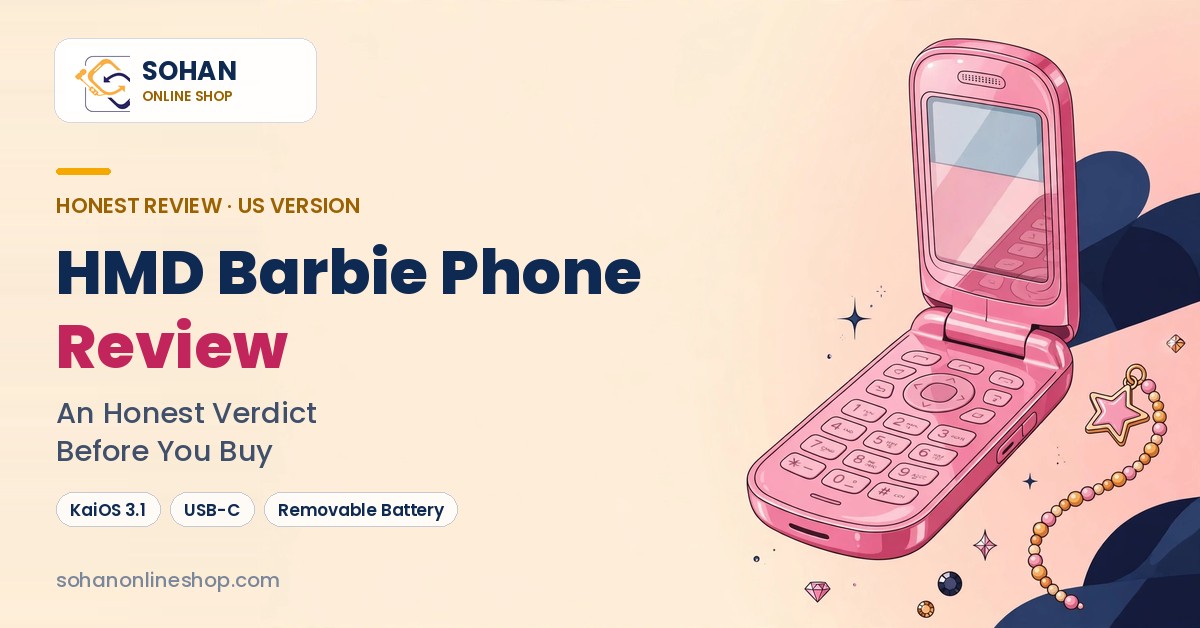
14Nokia 2780 Flip vs HMD Barbie Phone: same bones, different soul
Under the sensible blue shell, the 2780 shares its platform with the HMD Barbie Phone — same KaiOS 3.1 software, same processor family, same 5 MP camera hardware, the same removable battery. So what differs?
| Nokia 2780 Flip | HMD Barbie Phone (US) | |
|---|---|---|
| Software | KaiOS 3.1 | KaiOS 3.1 |
| Camera | 5 MP | 5 MP |
| Battery | 1,450 mAh removable · up to 7 h talk (manufacturer) | 1,450 mAh removable |
| Hearing-aid rating | M4/T4 | M4/T4 |
| Emergency help | Dedicated physical SOS key with family call-chain | SOS/emergency key |
| Colours | Blue, red, black | Power Pink only |
| In the box | Charger, cable, ejector tool, guide | Charger, 2 extra covers, stickers, charms, lanyard, cloth |
| Personality | A sensible shoe | A whole aesthetic universe |
For a parent, the 2780 is the rational buy — calmer colours, the same honest limits, an SOS system built for the job. For a Barbie fan who wants a detox phone that makes them smile, our full Barbie Phone review covers that one in the same honest detail.
15What most reviews won’t tell you
- The old reviews aren’t lying about WhatsApp — they’re just old. This phone had it in 2022; it ended in February 2025. Any listing or video still implying otherwise describes a phone that no longer exists.
- The SOS button arrives switched off, in effect. No setup, no rescue chain — the phone’s most important feature depends on ten minutes of homework nobody advertises.
- There’s no Wi-Fi calling, and for weak-signal rural homes that matters more than any other spec line.
- AT&T’s own approved list doesn’t name this phone, whatever shop listings claim. IMEI check first.
16Decide in 10 seconds
your parent needs calls and texts to just work — loudly, clearly, for days — and someone will set up the SOS key with them.
WhatsApp, video calls, or turn-by-turn maps are part of how your family connects.
you’re on AT&T, or the house has weak indoor signal — an IMEI and signal check take five minutes and decide everything.
17What’s in the box
Not included: a SIM card, a memory card, or headphones.
18Frequently asked questions
Does the Nokia 2780 Flip have WhatsApp?
No. The 2780 did have WhatsApp when it launched in November 2022, but WhatsApp ended its KaiOS service — new logins closed in June 2024 and the service stopped completely in February 2025. Older reviews still mentioning it are out of date.
How does the SOS button work — and what are its limits?
Once a family member switches on Accessibility Mode and saves ICE (emergency) contacts, holding the side SOS key for 3 seconds — or pressing it twice quickly — makes the phone call those contacts one by one, up to 10 rounds, send a pre-written SOS text if nobody answers, and switch to loud handsfree when a call connects. Its limits: it calls your family, not 911; no fall detection; and it does nothing until someone does the one-time setup.
Is the Nokia 2780 Flip good for someone with hearing aids?
Yes — it’s one of the best basic phones for hearing loss on paper. It’s rated M4/T4, the top tier of the hearing-aid compatibility scale, and supports RTT real-time text during calls, with a loud earpiece and loudspeaker. The one asterisk: it has no Wi-Fi calling, so check that carrier signal is solid at home first.
Does the Nokia 2780 Flip work on Verizon, AT&T and T-Mobile?
T-Mobile is the safest: full band support, including band 71. Verizon works for most buyers — owners widely report successful activation, though Verizon may disable the hotspot feature. AT&T is disputed: retailers claim compatibility, but the phone doesn’t appear on AT&T’s own approved-device list we’ve reviewed, so check your IMEI with AT&T before relying on it.
How long does the battery really last?
Days, the way most seniors use it: owners and long-term reviewers report two to three days or more with calls and texts, up to five or six days of light use. HMD advertises up to 7 hours of talk time, while PCMag’s lab test of non-stop 4G calling lasted 3 hours 24 minutes. One tip matters: leave Wi-Fi and Bluetooth off when unused, or standby drains much faster.
Is it easy to set up for a parent?
Yes, with one warning: the battery is packed separately in a bag under the box’s cardboard divider, and many buyers think it’s missing. Fit the battery and a nano-SIM (not included), turn on Accessibility Mode and Large text, add the ICE contacts, and test the SOS key together — about ten minutes, per our setup section above.
19The bottom line
The Nokia 2780 Flip is not the best phone you can buy your parent. It’s something rarer: an honest one — loud, clear calls for days on a charge, genuine respect for ageing hands and ears, and an SOS key that, once your family does ten minutes of homework, is a small, real safety net.
It is also a phone with no WhatsApp, a sluggish system, a hinge we wouldn’t bet a decade on, and no Wi-Fi calling for weak-signal homes. Both paragraphs are the review.
If your family’s connection runs on calls and texts, this plain blue flip is a real answer. Check it on Amazon → — eyes open, setup scheduled, no regrets.
How we review: Sohan Online Shop sells Nokia and feature phones in Bangladesh every day. This review is built from HMD’s official documentation and user guide, carrier information, cross-checked editorial sources such as PCMag, Consumer Reports and NokiaMob, and the recurring patterns in verified buyer feedback — read and rewritten in our own words. We have not yet imported a US unit to our Dhaka shop for hands-on testing; when we do, this page will be updated and the change noted here. We correct our articles when facts change — that’s the deal.



 Software
 CapCut
 Camera
 Charger
 Gadgets
 Earbuds
 Mobile Phone
 Nokia
Nokia Samsung

 Home Decor
 Home Appliances

 Smart Watch